Your team’s knowledge, always current.
Dazr Wiki keeps what your organisation knows in one calm place. Pages are written with the Docs editor, kept in spaces, owned by a named person and checked on a schedule, so what you find is up to date.
Part of Dazr Starter, Pro and Enterprise, for everyone in your organisation.
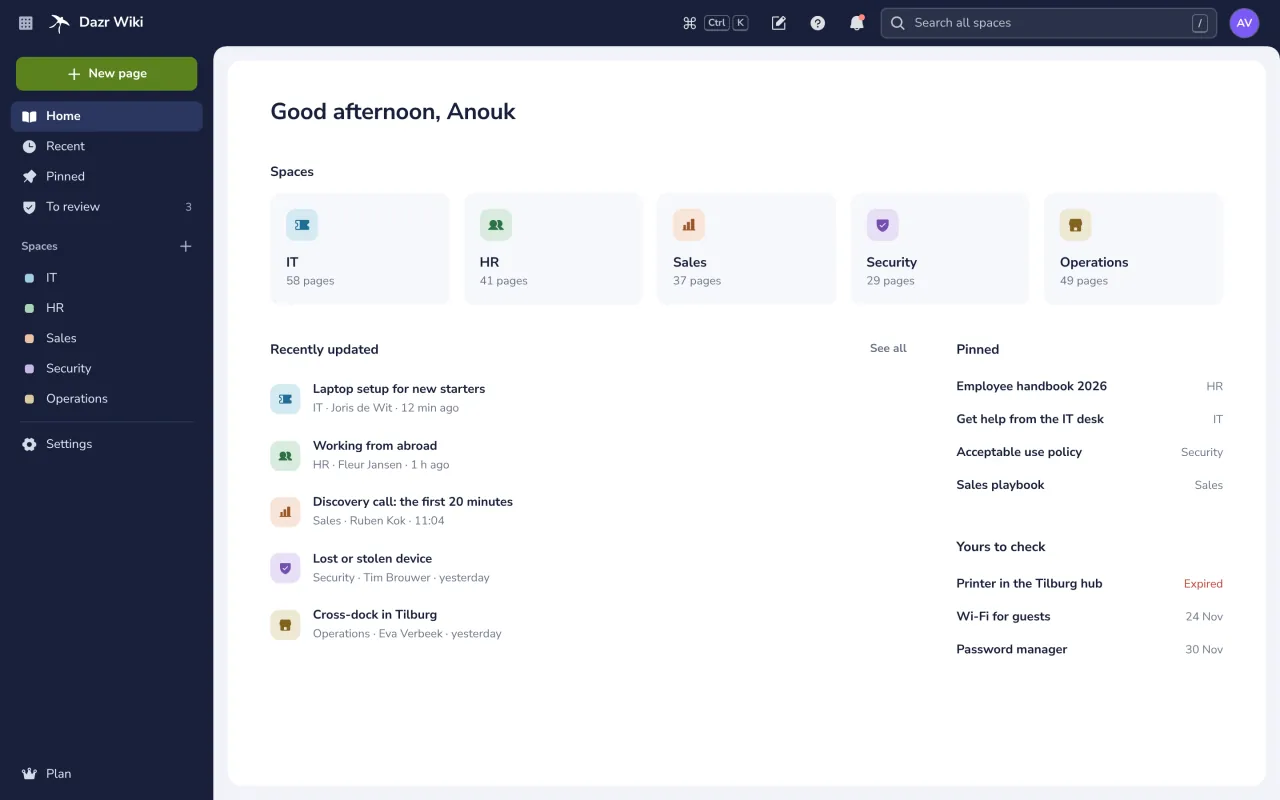

The wiki home of a logistics company, with five spaces and three pages to check. On the right, a page on a phone.
One place for every team.
Spaces for IT, HR, Sales or anything else, each with its own pages and people.
Each space has a tree of pages that you nest and drag into order. A deleted page stays in the trash for 30 days.
Pin the pages everyone needs, such as the employee handbook or how to get help from the IT desk.
Home shows the pages updated lately, who changed them and when.
Every page has an owner.
And a date until which it is checked, so nobody has to guess whether it is still true.
Verified until
The owner marks a page as checked, and the space decides how long that holds: 30, 90, 180 or 365 days. Two weeks before the date, the owner gets a reminder.
- Pages past their date show up in To review.
- Search can show verified pages only.
- Owner, check date and last edit sit in one quiet line under the title.

Write together, live.
Pages use the editor you know from Dazr Docs.
Rich pages, edited together
Headings, lists, callouts, tables, mentions, pictures from Dazr Files and live ranges from Dazr Sheets. Type / for the menu. Colleagues who edit with you show as named cursors, and comments sit in the margin.
- Saved as you type. Readers see the new version when you press Done.
- The last 30 published versions in the history, each one a click away.
- Comments with replies, marked done once settled.

Find it in one search.
Across every space you may open.

Narrow by space, kind and date, or switch on Verified only.
Files attached from Dazr Files show up in the results next to the pages.
Not finding it? Ask in the space’s Dazr Teams channel, right from the results.
The right people, the right pages.
Access for each space and each page.
Roles you can explain in one line
Choose who opens a space: everyone in your organisation, only the people added, or only those who manage it. Then give people and groups Can view, Can comment, Can edit or Owner.
- A group can follow the members of a space in Dazr Teams.
- Guests from outside sign in with a one-time code and see only the pages you pick, until an end date.
- A page can have its own access, shown as a lock in the tree.
- Every change to access is logged.

Connected to your other Dazr apps.
Links, not copies: each app keeps its own data.
The page editor is the Docs editor, with its tools, comments and version history.
A Sheets range shows live cells on the page and opens the sheet in one click.
Insert pictures and attach files from Dazr Files.
Share a page in a channel, ask in a channel from search, and let a channel know when a page changes.
Link a page as evidence for a control. Compliance keeps each published version, and check dates keep the evidence current.
People and groups come from your organisation in Dazr Identity, so someone who leaves loses access at once.
Part of Starter, Pro and Enterprise.
Dazr Wiki is included in the Dazr Suite plans for organisations, with no separate price.
Every member covered by your organisation’s plan reads, writes and owns pages.
Up to 50 spaces, 1,000 pages in each space and 100 guests per space.
Pages, comments and history are encrypted and stored in the EU by Dazr, a company in Italy.
See pricingDazr DocsDazr SheetsA European Confluence alternativeA company wiki for the GDPR
Questions and answers.
Which plans include Dazr Wiki?
Dazr Starter, Pro and Enterprise, for the organisation. It is not part of Free and Personal. See pricing
How does Verified until work?
The owner of a page marks it as checked, and it stays verified for the period its space sets: 30, 90, 180 or 365 days. Two weeks before the date the owner gets a reminder, and once the date has passed the page shows up in To review.
Can people outside my organisation read pages?
Yes, as guests. Someone who manages the space invites them by email, picks the pages they may see and sets an end date. Guests sign in with a one-time code and can view or comment, never edit.
Can I bring pages from another wiki?
There is no automatic import yet. You write pages in the Docs editor, where you can paste text in, and attach files from Dazr Files.
Where are my pages stored?
Encrypted, in the EU, by Dazr, an Italian company. We do not sell your data or use it for advertising.
Do I need to install anything?
No. Dazr Wiki runs in the browser on your computer and your phone, at wiki.dazr.eu.
Write down what your team knows.
Dazr Wiki is part of Dazr Starter, Pro and Enterprise.